
What is Event Contract and How to Place an Order on XT
Hợp đồng vĩnh viễn
What is an Event Contract?
Event contracts are market-prediction-based trading products that allow traders to speculate on the outcome of a specific event and earn profits. Each contract order represents a user’s choice of outcome—“Yes” or “No”. If your prediction aligns with the underlying asset’s price trend at the end of the contract period, you earn profits; if your prediction is incorrect, you will lose the principal of that order. Currently, the XT app supports both Bullish and Bearish event contracts. Contract types may be dynamically adjusted in response to market demand and compliance requirements.
How to Use Event Contract?
- Go to the Event Contract trading interface
Open the XT app, log in, and tap Event Contract at the top of the Futures trading page.
- Select a trading pair
On the Event Contract homepage, you will see the followings:
- The top bar displays the market name of the current trading pair (1) and the corresponding index price (2). Tap the question mark icon in the top-right corner to access the Help Center for more detailed explanations and FAQs.
- The middle section shows the price chart for the current trading pair. You can switch between different timeframes for a clearer view of market trends.
You can also switch trading pairs in the list bar to view the current trading pair.
- Choose an order period
Scroll down to the middle section of the homepage to place an order.
- Select your desired period. Your order will automatically close and settle when it ends.
- Enter an amount or choose one of the preset amounts below.
- Select the direction (Bullish/Bearish) and tap on it to place the order.
- Enter your order amount
Before entering the order amount, you can transfer funds from your Spot, Margin, or Earn account to your Event Contract account by tapping on the Transfer button next to your balance. Currently, only funds in your USDT-M account can be used for Event Contract.
After entering the amount, check the Estimated Futures Margin Ratio and the status indicator dot below. The event contract order will use margin from your USDT-M account. If the fund occupation ratio exceeds 30%, the dot will turn red, signalling that you should operate cautiously or reduce your order size.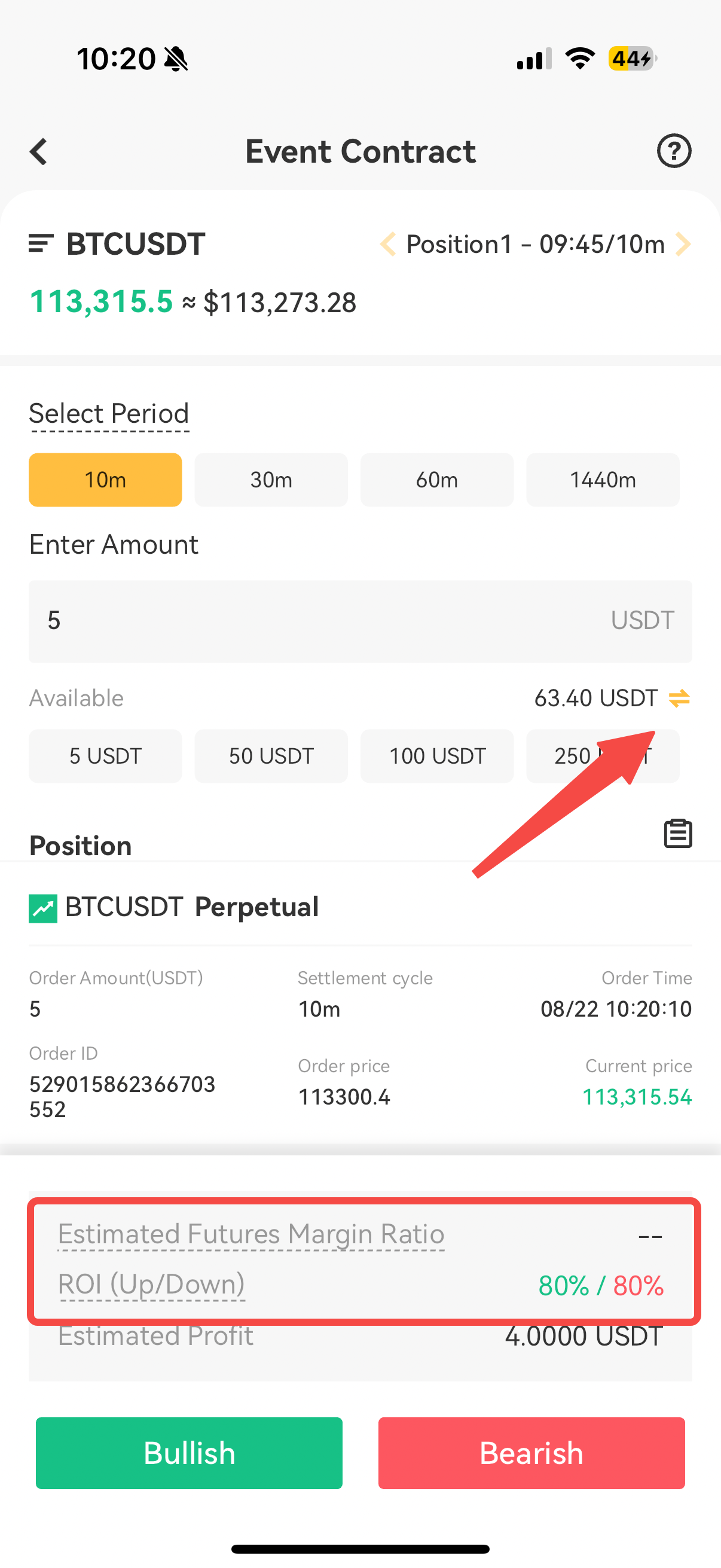
- Select your trading direction
Based on your market prediction, choose whether the price will be higher or lower at the end of the period:
- Bullish: You believe the price index will rise.
- Bearish: You believe the price index will fall.
After placing your order, a confirmation window will appear. Verify the information and tap Confirm. Before this you can tick "Do not show again" to skip future confirmations.
- View position information
After placing an order, scroll down on the homepage to view your current positions. Tap the records icon on the right to check historical orders.
While holding a position, the homepage displays a countdown and period information for that position. Your entry price and time will be marked on the chart. Click the left/right arrows to view your different positions.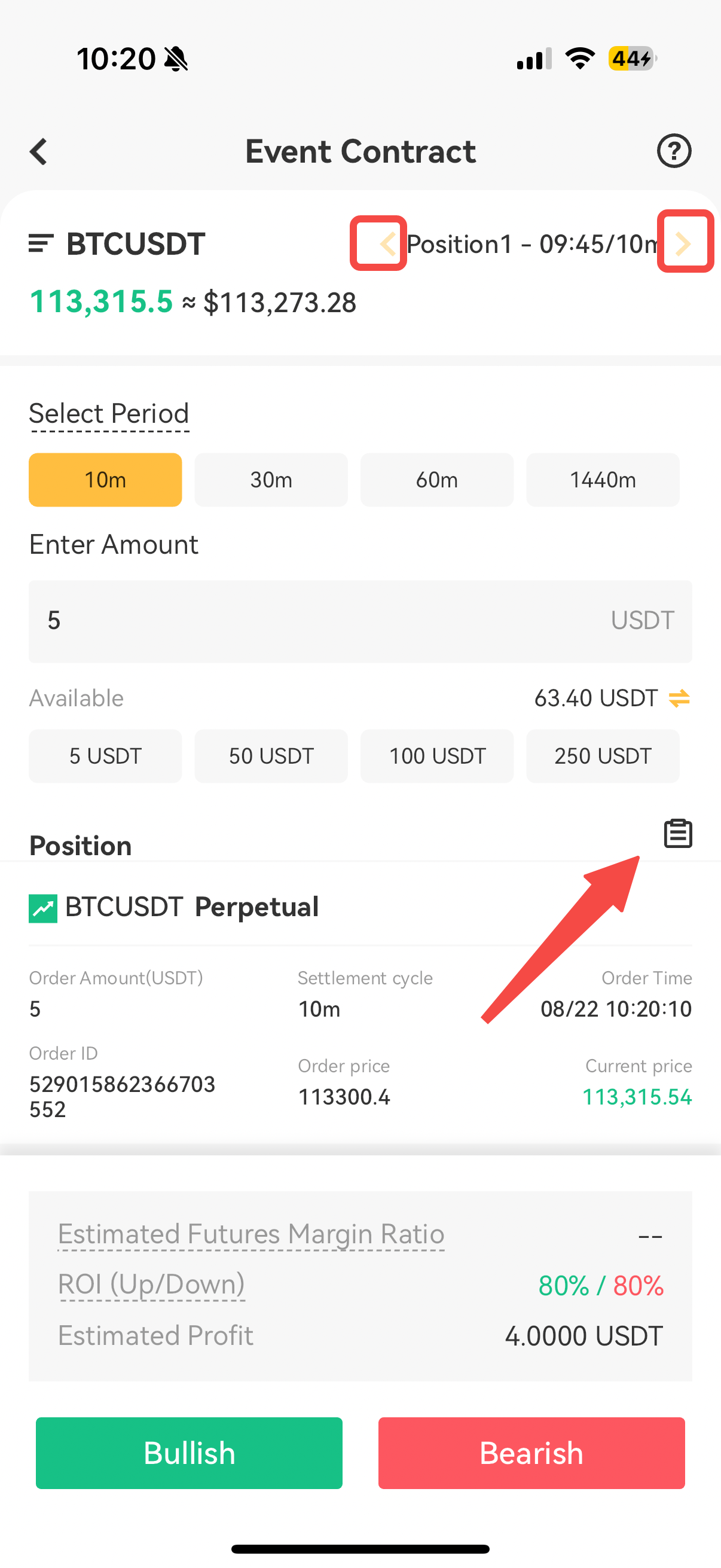
Monitor your Event Contract assets and margin on the Assets page under Event Contract. Please note that Event Contract orders share the same account as the USDT-M account, so total asset values match the USDT-M display.
- View realized PnL (after settlement)
Check your Event Contract PnL on the History page. Use the filters at the top to sort by different criteria.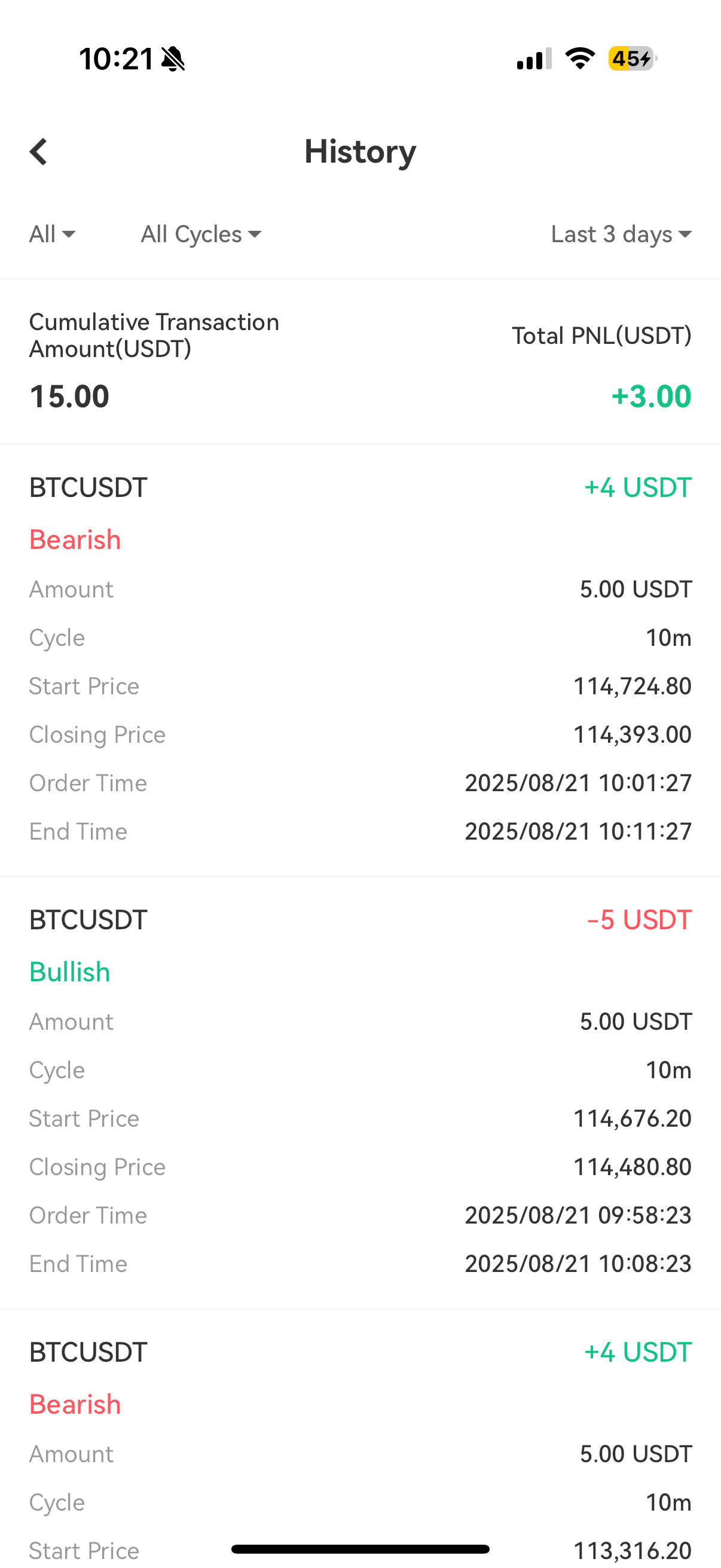
- View fund flows
To check Event Contract-related fund flows, please go to USDT-M Futures - Transaction page.
Event Contract FAQs
-
Does Event Contract trading count toward campaign trading volume?Yes, all Event Contract trading volume counts toward relevant futures trading volume.
-
Are there any commissions for Event Contract orders?Not currently. Stay tuned for updates.
-
Are there fees or funding rates for Event Contract orders?No. Event Contract orders have zero trading fees and no funding rates. Users place orders via Bullish and Bearish buttons. Correct predictions yield profits; incorrect predictions result in loss of the order’s principal.
-
How are unusual market conditions (e.g., price spikes) handled at settlement?We use index prices for all orders to minimize the impact of spikes. In the rare case of an index service interruption, orders will settle at the theoretical end price once services resume.
-
How is profit calculated? Does it change with the period?Your profit rate is locked in when you place your order and will not change. Rates are dynamic and can differ in "Bullish" and "Bearish" orders.
-
What is the Estimated Futures Margin Ratio?Event Contract orders use margin from your USDT-M account. This impacts your margin ratio and liquidation price if you hold cross-margin positions. The Estimated Futures Margin Ratio shows your projected ratio before you confirm the order. The yellow/red status indicator dot signals caution.
-
Can sub-accounts trade Event Contract orders?Yes, if the master account is KYC-verified and eligible, sub-accounts automatically inherit access upon the same verification.
-
How are Event Contract orders settled?All orders are settled in USDT. A correct prediction credits profit to your USDT-M account; an incorrect prediction results in a loss of the initial cost.
-
How is the Event Contract order PnL calculated?A winning order pays the fixed bonus amount agreed upon when you opened the position. A losing order expires and costs the initial premium. If the settlement price is exactly equal to the strike price, the bonus is paid out.
-
Are Event Contract orders available via API?Currently, Event Contract orders are only supported on iOS and Android apps.
-
Can I close an Event Contract order early?No. Once placed, Event Contract orders cannot be closed or cancelled and will expire at the end of the set period.